Line items are the priced rows that make up an estimate. Estimation Builder prices each one the way your trade actually bids — by area, by volume, by quantity, by the foot, by the hour, or as a flat rate — and totals them for you as you go.
Open the items window
While creating or editing an estimate, click Add Items to open the items window.
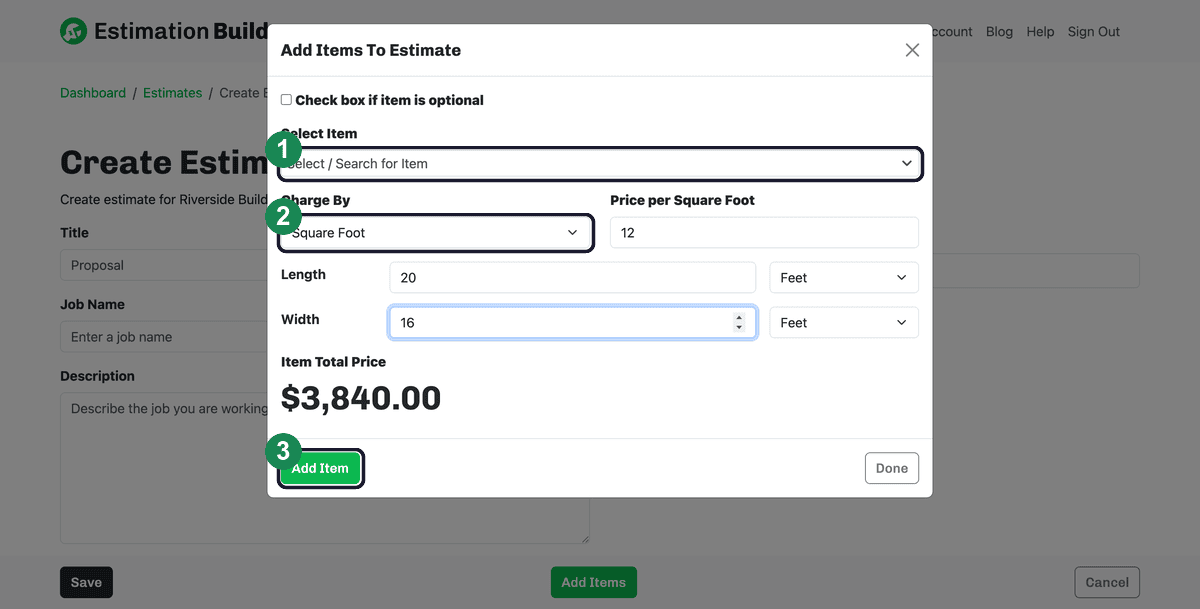
- Select Item — search your saved catalog and pick an item. To add one that isn't in your catalog yet, type its name and click the Add New Item button that appears — it's saved to your catalog and selected for you.
- Charge By — choose the pricing method. The fields below change to match it.
- Add Item — adds the line to the estimate. Keep adding items, then click Done when you're finished.
The six ways to charge
- Square Foot — a price per square foot times a length and width (each in feet or inches). Example: a 20 ft × 16 ft patio at $12/sq ft totals $3,840.
- Cubic Foot — a price per cubic foot times length, width, and height. Good for concrete, fill, and mulch.
- Quantity * Price — a unit price times a count. Good for fixtures, posts, or anything you sell by the each.
- Flat Rate — a single fixed price for the line, with no measurements.
- Per Foot — a price per linear foot times a length. Good for fencing, trim, or curb.
- Per Hour — an hourly rate times a number of hours. Good for labor.
Tip: Tick Check box if item is optional to present a line as an optional add-on rather than part of the base price.
Watch the total
The Item Total Price updates as you type, and the estimate's Grand Total updates each time you add a line — so you always know where the bid stands. When you're done, click Done, then Save the estimate.