Each estimate moves through a simple lifecycle. Knowing the statuses helps you keep your pipeline tidy — what's waiting on the customer, what's in progress, and what's done.
Accepting an estimate
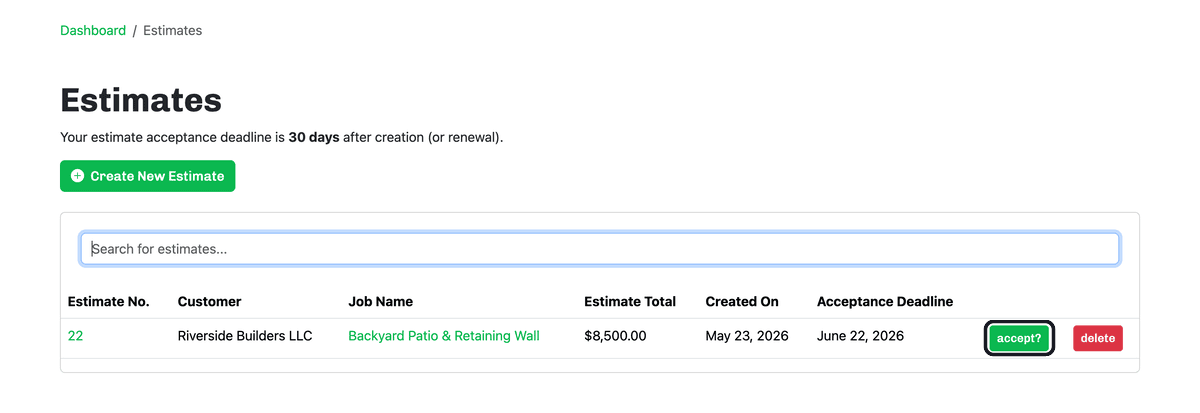
A new estimate waits for the customer's go-ahead. On the Estimates page, click accept? on the estimate's row once the customer approves it.
The full lifecycle
- Accepted — the customer approved it and the job is a go. Accepted estimates show under Active Work on your dashboard.
- Completed — the work is done.
- Finished — the job is paid and fully closed out, filed in your History. The button for this step is labeled Paid and Finished.
- Held — paused for now (waiting on materials, a decision, and so on). You can take it off hold later.
- Canceled — the job isn't happening. You can un-cancel it if it comes back.
Your dashboard groups these for you: Active Work (Accepted, Held) and History (Completed, Finished, Canceled) — so you always know where each job stands.
Moving an estimate along
Once an estimate is accepted, you'll find its next actions by opening that list from your dashboard:

- On Accepted Estimates, each row has Complete, Put On Hold, and Cancel.
- On Completed Estimates, click Paid and Finished to close the job out once you've been paid.
- On Estimates Put On Hold, click Remove Hold to make it active again.
- On Canceled Estimates, click Reinstate to bring it back.
Note: An estimate also has an acceptance deadline (30 days by default). If it lapses before the customer accepts, the estimate is marked expired — see Renewing an expired estimate.