If you bid similar jobs over and over, save a template once and reuse it. A template stores a set of line items you can drop into a brand-new estimate, so you're not rebuilding the same lines every time.
Save an estimate as a template
Open an estimate that has at least one line item, then click Save as template in the action bar at the bottom of the page.

A dialog opens. Give the template a Name (it starts with the job name, but you can change it) and, if you like, add internal Notes — notes are for you only and never appear on an estimate. Click Save template to finish.
Or build a template from scratch
You don't need an existing estimate. Open Templates from your dashboard and click New Template to build one from a blank slate — handy for setting up your common job types before you've written your first estimate.
Use a template
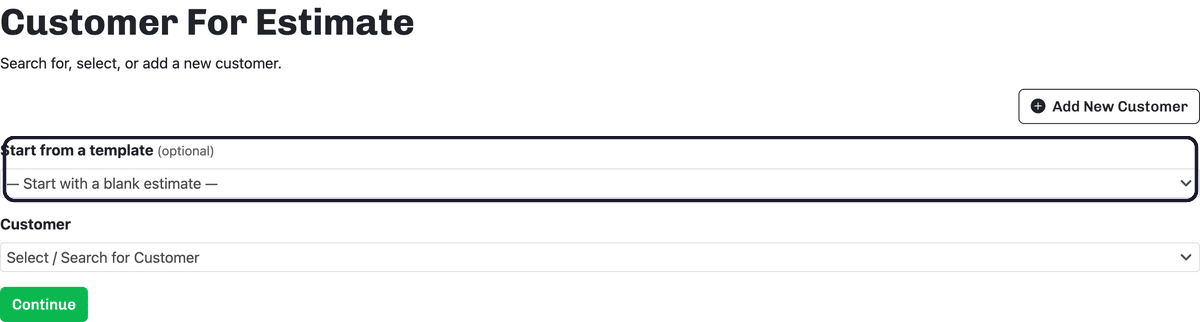
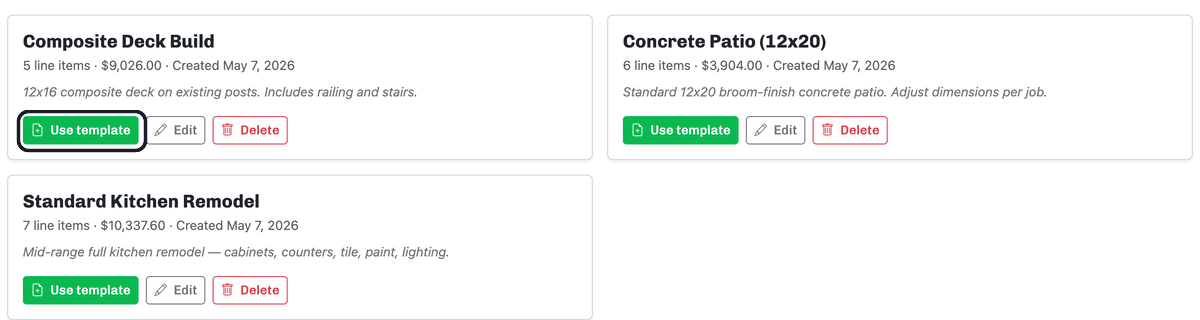
Open Templates from your dashboard and click Use template on the one you want. You'll land on the Customer For Estimate screen with that template already chosen under Start from a template — pick the customer this job is for and click Continue. Your new estimate opens pre-filled with the template's line items, ready for you to adjust the quantities and prices for the specific job.
You can also start from a template when you create a brand-new estimate: on that same Customer For Estimate screen, choose one from the Start from a template dropdown instead of leaving it blank.