Your card lives on the Account page, under Payment Method. That's where you add a card to subscribe after your trial, and where you replace it later if it changes.
Add a card to subscribe
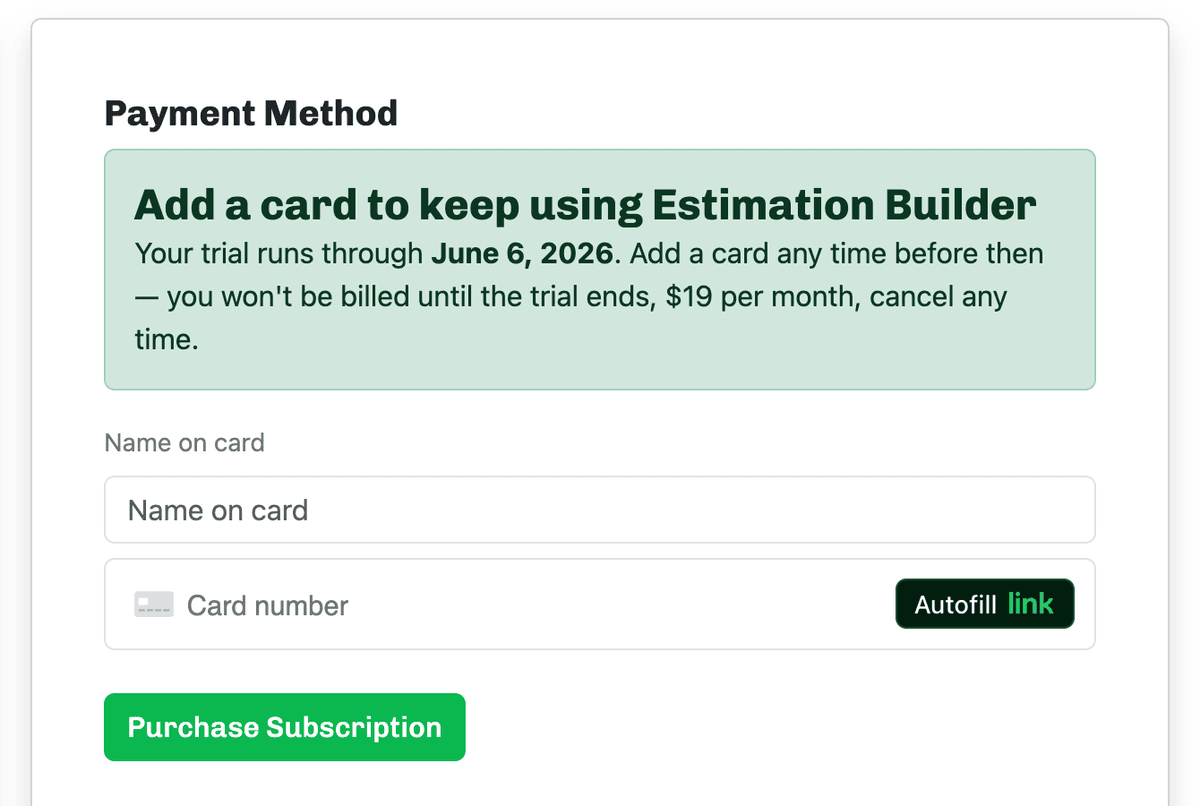
While you're on the free trial, the Payment Method section invites you to add a card to keep going. Enter your Name on card and card details, then click Purchase Subscription. You won't be billed until your trial ends — after that it's $19.00 per month, and you can cancel any time.
Update the card on file
Once you have a card saved, the Account page shows it (card type, last four digits, and expiration) with an Update Credit Card Details form. Enter the new card and click Update to replace it — handy when a card expires or you switch to a different one.
Good to know: Updating your card only changes the card we charge — it doesn't change your price or your plan. Your monthly rate stays exactly the same.